Microsoft Teams Business Review 2026 — SaaS & Productivity, Pricing & Verdict
Our Verdict
Microsoft Teams Business is a robust video conferencing solution, well integrated into the Microsoft 365 ecosystem, offering excellent value for money for businesses already embedded in the Microsoft universe.
Microsoft Teams Business stands out for its great functional richness, covering video conferencing, messaging, file sharing and real-time collaboration within a single platform. Its native integration with the entire Microsoft 365 suite — Outlook, SharePoint, OneDrive, Office — makes it a strategic choice for organizations already equipped with these solutions. The value for money is particularly competitive, especially when Teams is included in an existing Microsoft 365 subscription. However, the learning curve remains noticeable for new users. The free offering limits group meetings to 60 minutes and 100 participants, like Google Meet, while Zoom's free plan stops at 40 minutes. Help documentation is available in French, and web and phone support is offered 24/7 on paid plans.
How this review was conducted
This review is a documentary assessment. It is based on Microsoft Teams Business's public interface, its published pricing and publicly available information, as recorded on 2026-06-03. No field test was carried out: no subscription, no purchase and no exchange with customer support took place. Some items were checked again on 2026-10-08 against the official pages cited. Pricing and terms change: check them on Microsoft Teams Business's own site before you decide.
The evaluation of Microsoft Teams Business was carried out by the editorial team based on a functional analysis of the platform via teams.microsoft.com. The criteria were assessed using a multicriteria grid covering user experience, reliability, features, integrations and value for money. No prolonged field test period was conducted; the evaluation was based on a direct analysis of the solution.
Criteria Breakdown
| Criterion | Score | Weight | Comment |
|---|---|---|---|
| Free trial & freemium | 7/10 | 5 % | |
| Ease of use | 7/10 | 15 % | |
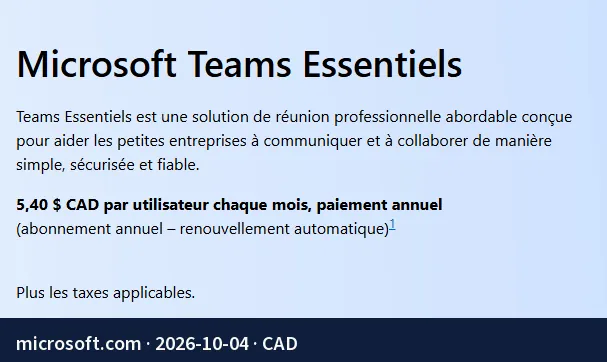
| Canadian billing | 7/10 | 5 % | Billed in Canadian dollars: Teams Essentials at CA$5.40 per user per month (annual commitment). |
| Reliability & uptime | 7/10 | 5 % | |
| Feature depth | 9/10 | 20 % | |
| Integrations & ecosystem | 9/10 | 15 % | |
| French support quality | 7/10 | 10 % | |
| Value for money | 9/10 | 25 % |
Strengths
- High-level reliability and availability, with Microsoft infrastructure designed to ensure service continuity
- Exceptional functional richness: video meetings, chat, channels, file sharing, whiteboard and much more
- Deep native integrations with the Microsoft 365 ecosystem and hundreds of third-party applications
- Excellent value for money, especially advantageous for existing Microsoft 365 subscribers
- Billing in Canadian dollars available, making accounting management easier for Canadian businesses
Weaknesses
- Free offering limited to 60 minutes per group meeting and 5 GB of storage per user
- Room for improvement in ease of use: the interface can seem complex for new users
- With Teams Essentials, live captions are available in English only (more than 30 languages in Microsoft 365 Business plans)
Who Is It For?
- SMEs and large enterprises already subscribed to Microsoft 365
- Hybrid teams requiring integrated document collaboration
- Canadian organizations looking for billing in Canadian dollars
- IT departments wanting to centralize communication tools
- Companies with high requirements for reliability and availability
Not Ideal For…
- Self-employed workers or freelancers looking for a free and simple tool without a subscription
- Small teams not using the Microsoft ecosystem and preferring a lightweight solution
- Occasional video conferencing users who do not need advanced features
- Organizations looking for a minimalist interface with immediate ease of use
Pricing
Microsoft Teams is included in Microsoft 365 Business subscriptions or available as a standalone version. A free offering exists but remains limited in meeting duration and storage.

Direct Alternatives
- Zoom Workplace — More intuitive interface, ideal for teams outside the Microsoft ecosystem
- Google Meet — Lightweight and free solution well integrated with Google Workspace, perfect for Gmail and Google Drive users
- Webex by Cisco — Enterprise alternative with a high level of security and compliance, suited to regulated sectors